
A profitable trading session should not end with a stiff neck, aching shoulders, or lower back pain. Yet many traders spend hours watching price movements without realizing how much physical strain their workstation creates.
I’ve found that the best sitting posture for day traders is not about sitting perfectly straight all day. It involves maintaining a naturally aligned spine, supporting the lower back, positioning monitors correctly, and moving regularly.
For traders monitoring the New York market open or following several currency pairs, these adjustments can make long sessions more comfortable without interrupting their trading routine.
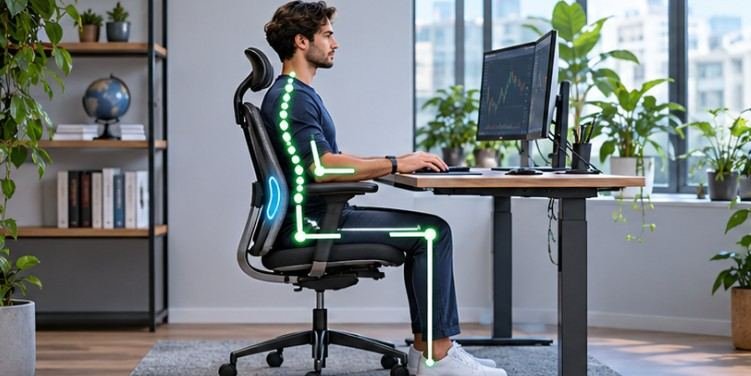
Understanding the 90-90-90 Sitting Position
The traditional 90-90-90 guideline offers a useful starting point for organizing a trading workstation.
It describes approximately 90-degree angles at the hips, knees, and elbows, while keeping the feet comfortably supported.
Maintain a Neutral Spine and Supported Lower Back
Sit toward the back of your chair, allowing the backrest to support your spine’s natural curves.
Avoid rolling your pelvis excessively forward or backward. Your lower back should feel supported rather than flattened or forced into an exaggerated arch.
According to Cornell University’s ergonomic guidelines, a slightly reclined backrest of approximately 100–110 degrees can be more comfortable than maintaining a rigid upright position.
This means the 90-degree guideline is a starting reference, not a position that must be maintained continuously.
Keep Your Feet and Knees Comfortable
Adjust your chair until both feet rest naturally on the floor.
Your knees should remain approximately level with your hips, with enough clearance behind them to avoid pressure from the seat edge.
If your desk requires a higher seating position, use a stable footrest rather than allowing your feet to hang.
Relax Your Shoulders and Align Your Arms
Keep your upper arms close to your torso, with elbows comfortably bent near 90 degrees.
Position the keyboard and mouse so your wrists remain straight instead of bending upward or sideways.
Armrests can provide occasional support, but they should not force your shoulders upward or place sustained pressure on your elbows.
Arrange Trading Monitors Without Straining Your Neck
A well-adjusted chair cannot compensate for poorly positioned screens.
Traders using multiple displays often develop awkward viewing habits because important charts appear too far left, right, or above their natural line of sight.
Position Your Main Monitor at Eye Level
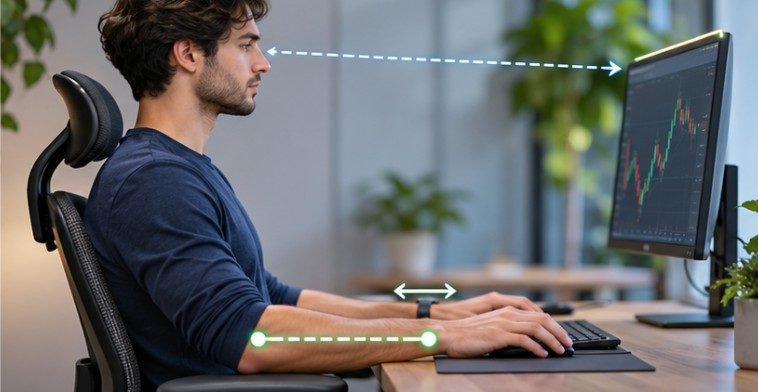
Place the primary trading screen directly in front of your seated position. The top of the display should generally be at or slightly below eye level. The most frequently viewed information should sit comfortably below your horizontal gaze.
The Occupational Safety and Health Administration recommends positioning the center of a monitor approximately 15–20 degrees below horizontal eye level.
This arrangement reduces the need to tilt your head upward repeatedly.
Use an Appropriate Viewing Distance
Keep your screen approximately an arm’s length away, adjusting according to its size, text readability, and your vision.
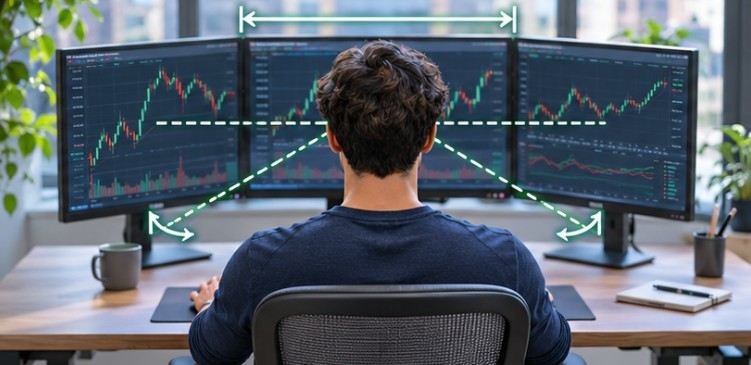
For a multi-monitor setup, position frequently used screens closest to the center.
Instead of repeatedly twisting your neck toward a secondary display, rotate your chair and upper body together when necessary.
Traders using progressive lenses may require slightly different monitor heights to avoid uncomfortable head positions.
The Five-Minute Trading Desk Posture Test
Before opening your trading platform, perform a quick ergonomic check.
Daily workstation checklist
Interactive
0 of 6 checks completed
0%
My lower back rests comfortably against the chair.
Both feet are supported, with relaxed knees.
My shoulders are down and my wrists are straight.
My primary chart is directly in front of me.
I can read prices without leaning toward the screen.
I have a plan for short movement breaks. If any position feels uncomfortable, adjust the chair, desk, or monitor before continuing.
A useful additional test is to sit normally for ten minutes and observe whether you gradually move your head forward. If that happens, your screen may be too distant or its text too small.
Why Movement Matters More Than Perfect Posture
Even excellent sitting alignment becomes uncomfortable when maintained without interruption.
The CDC’s National Institute for Occupational Safety and Health reports that additional five-minute breaks each hour reduced overall musculoskeletal discomfort and eyestrain in workplace research.
For traders, the challenge is scheduling movement without disrupting important decisions.

Build Breaks Around Market Activity
During quiet market periods, stand up, walk briefly, and relax your shoulders.
Consider taking a short movement break approximately every 30–60 minutes, depending on your workload and comfort.
During the New York trading session, alerts and predetermined trading levels can help reduce unnecessary screen monitoring.
For example, a trader could stretch after reviewing completed trades rather than remaining seated while waiting for another setup.
If you use a standing desk, alternate positions gradually. Standing continuously is not inherently better than prolonged sitting.
Protect Your Eyes and Reduce Upper-Body Tension
Screen-related fatigue often encourages traders to lean forward, squint, or raise their shoulders unconsciously.
The American Optometric Association recommends the 20-20-20 rule: every 20 minutes, look at something approximately 20 feet away for 20 seconds.
Blinking frequently and adjusting screen brightness can also improve visual comfort.
Keep chart fonts readable and reduce distracting glare from nearby windows.
Traders should avoid assuming that a dark chart theme automatically prevents eye fatigue. Comfortable contrast, screen positioning, and regular visual breaks matter more than any particular color scheme.
How Trading Stress Changes Your Body Position
Emotional pressure can influence how traders sit.
During a sudden price reversal, someone may lean toward the monitor, grip the mouse tightly, or hold tension in their shoulders.
These reactions are understandable, but maintaining them for extended periods can increase discomfort.
Recognizing physical tension also creates an opportunity to assess emotional decision-making.
Learning how to separate your self-worth from your trading performance can support a more balanced response to losses and unexpected market movements.
Good posture cannot guarantee better trading results, but physical comfort can remove one avoidable source of distraction.
Choosing a Chair That Supports Healthy Trading Habits
An expensive gaming chair is not necessarily the most suitable option for long trading sessions.
Prioritize adjustable seat height, dependable lumbar support, sufficient seat depth, and a backrest that allows comfortable reclining.
A breathable seat and adjustable armrests can provide additional comfort.
Before buying, test whether you can maintain supported feet, relaxed shoulders, and a neutral wrist position while using your actual desk.
Traders experiencing persistent pain, numbness, or tingling should seek appropriate medical assessment rather than relying exclusively on ergonomic changes.
Frequently Asked Questions
1. What is the best sitting posture for day traders?
Sit with your lower back supported, feet resting comfortably, shoulders relaxed, and head aligned above your torso. Keep your monitor near eye level and change positions regularly.
2. Should traders use standing desks?
Standing desks can help traders alternate positions throughout the day. However, prolonged standing can also cause discomfort, so regular movement remains important.
3. How often should day traders leave their chairs?
Short breaks every 30–60 minutes provide opportunities to move and reduce prolonged sitting. Adjust the frequency according to personal comfort and trading conditions.
4. Can poor sitting posture affect trading concentration?
Physical discomfort may distract traders and make sustained attention more difficult. However, better posture alone does not establish improved profitability or decision-making accuracy.
A Healthier Way to Approach Every Trading Session
I’ve learned that creating a comfortable trading environment requires more than purchasing monitors or choosing an expensive chair. Small adjustments to seating position, screen placement, and movement habits can make a meaningful difference.
The best sitting posture for day traders should feel supported, natural, and flexible rather than rigid or exhausting.
Before your next session, spend a few minutes adjusting your workstation. Keep your feet supported, relax your shoulders, and make room for regular breaks.
Successful trading depends on disciplined decisions, but maintaining physical comfort is one habit worth protecting regardless of market performance.